
If you’re learning how to post a job on Snagajob, this guide walks you through the entire process from creating your account to publishing your listing.
We’ll also explain whether Snagajob is free for employers and highlight the best places to post hospitality jobs, including a strong alternative for industry-specific hiring.

Steps To Post a Job on Snagajob
Below is a quick walkthrough showing how to post a job on Snagajob from start to finish.
1. Go to Snagajob Employer page
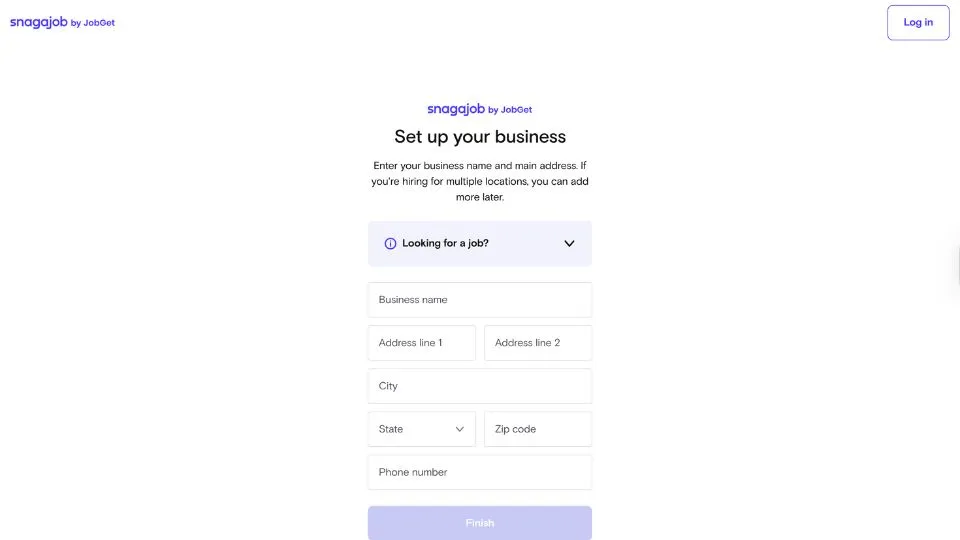
On your browser, go to Snagajob's employer page and enter your email address to get started.
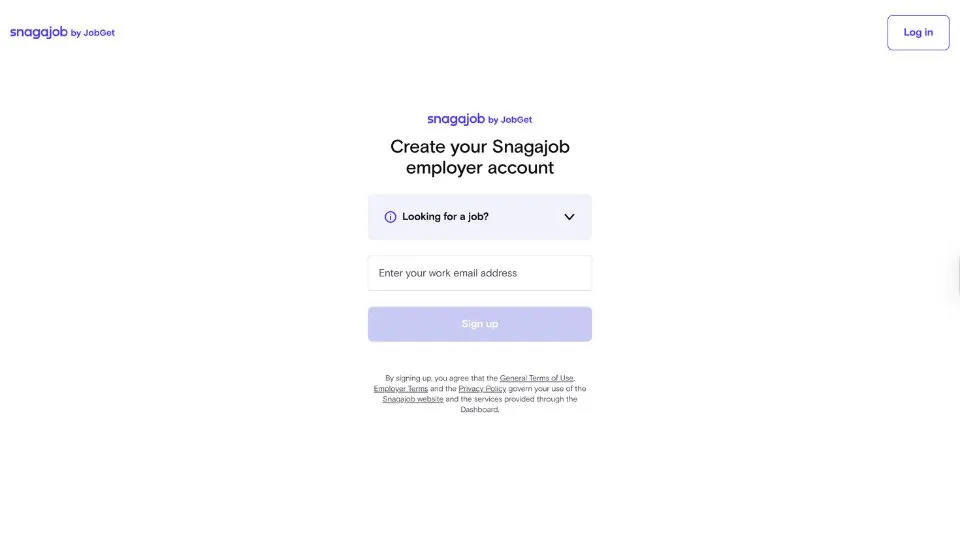
You’ll be asked to create an account and select how many roles you need to hire for.
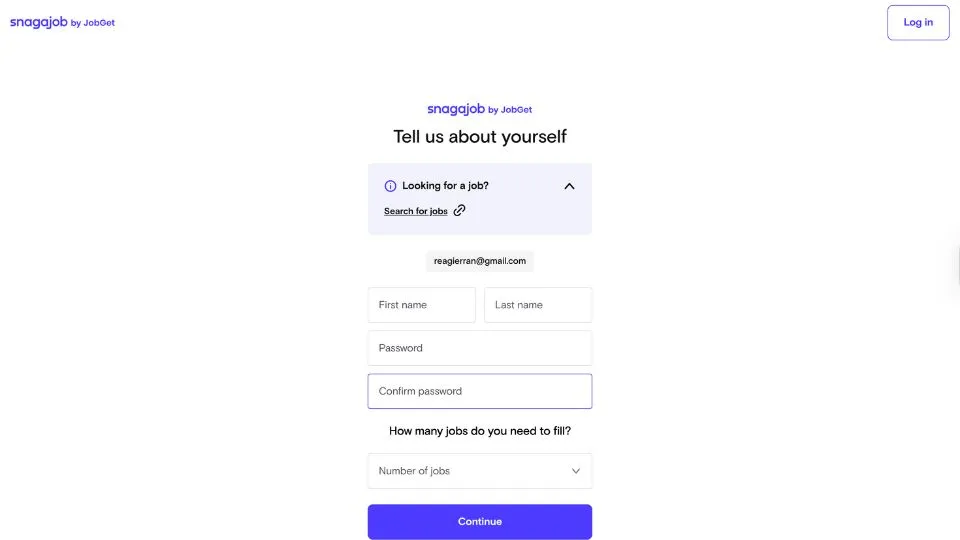
After that, you’ll be prompted to enter your business address and phone number to complete your profile.
2. Access your Snagajob employer dashboard
This is the main dashboard you’ll see after logging into your Snagajob employer account.
From here, you can start creating your first job post, review Snagajob’s hiring guide or set up your payment method so you can publish job listings.
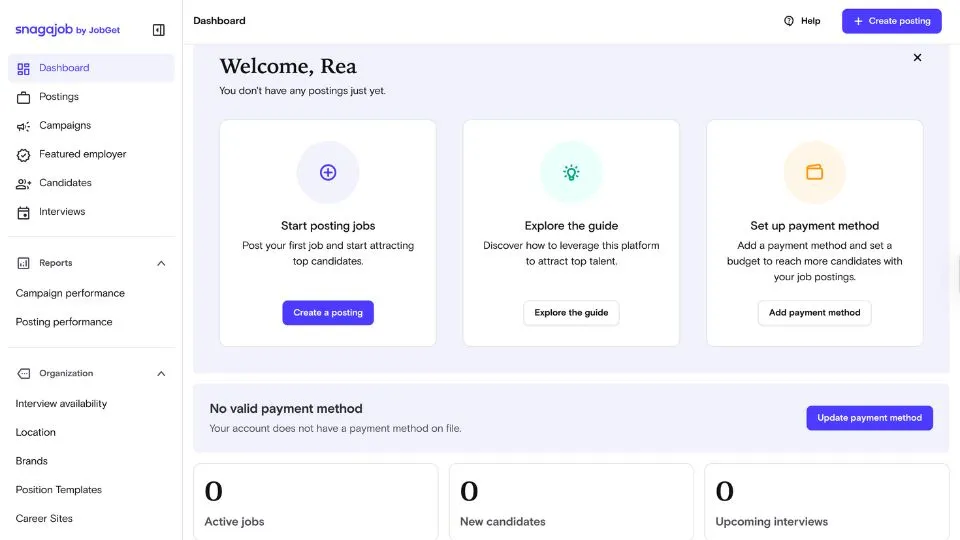
A notice appears if no payment method is on file, along with a button to update it.
Use the left-hand menu to navigate to postings, campaigns, candidates, interviews, reports and your organization settings.
You can also view basic activity summaries at the bottom, including active jobs, new candidates and upcoming interviews.
3. Enter your brand, position and location details
This is where you begin creating your job post. Start by selecting or typing your brand name and optionally upload a logo to make your posting stand out.
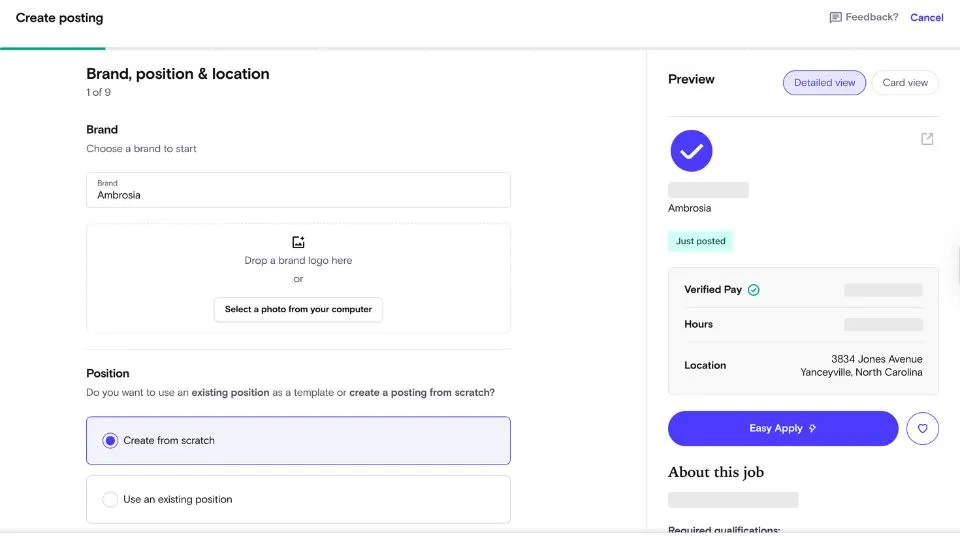
Next, choose whether to create a new position from scratch or use an existing position template if you’ve posted before.
On the right side, you’ll see a preview panel showing how your job listing will appear to candidates, including your business name, pay details, hours, and location.
Once everything looks correct, click Next to continue.
4. Set your industry, job title and job category
Choose the industry that best matches the role you’re filling, then enter a clear and accurate job title.
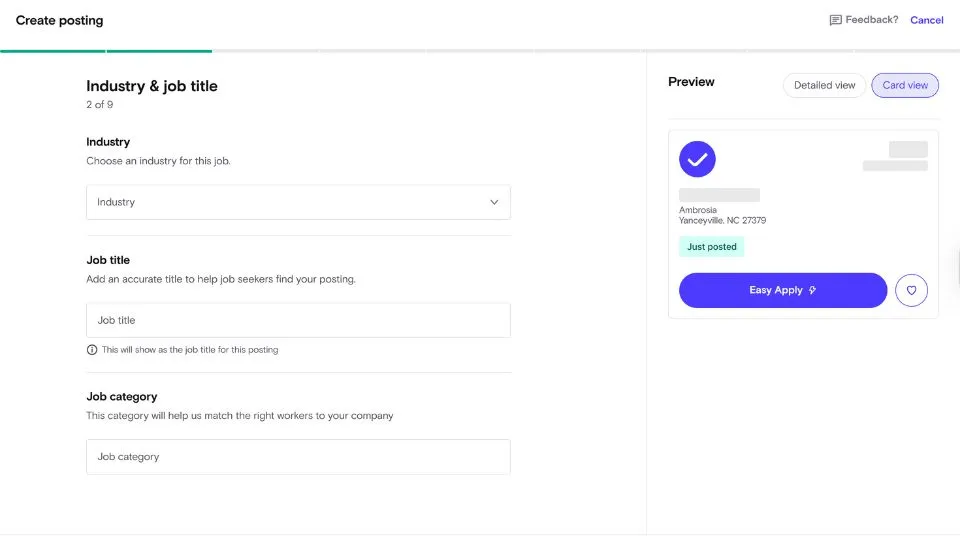
Select the job category that fits the position so Snagajob can match your listing with the right candidates.
The preview on the right updates as you add details, and you can click Next once everything looks correct.
5. Set the pay range and schedule
Enter the minimum and maximum pay for the role, then choose whether the rate is hourly or salaried.
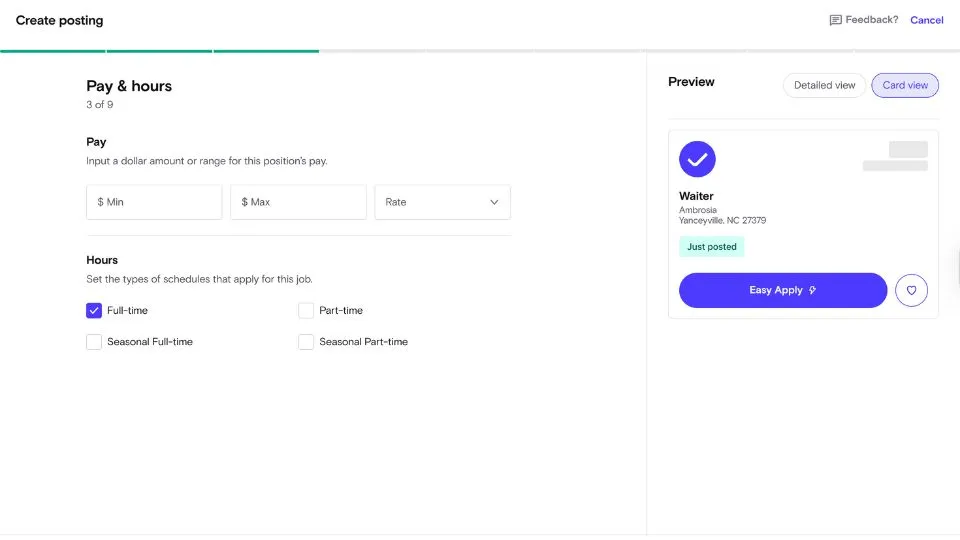
Select all schedule types that apply, such as full-time, part-time or seasonal options.
The job preview on the right updates automatically based on the details you enter. When everything looks accurate, select Next to continue.
6. Add the required and preferred qualifications
Choose the qualifications candidates must meet, such as legal work authorization or minimum age.
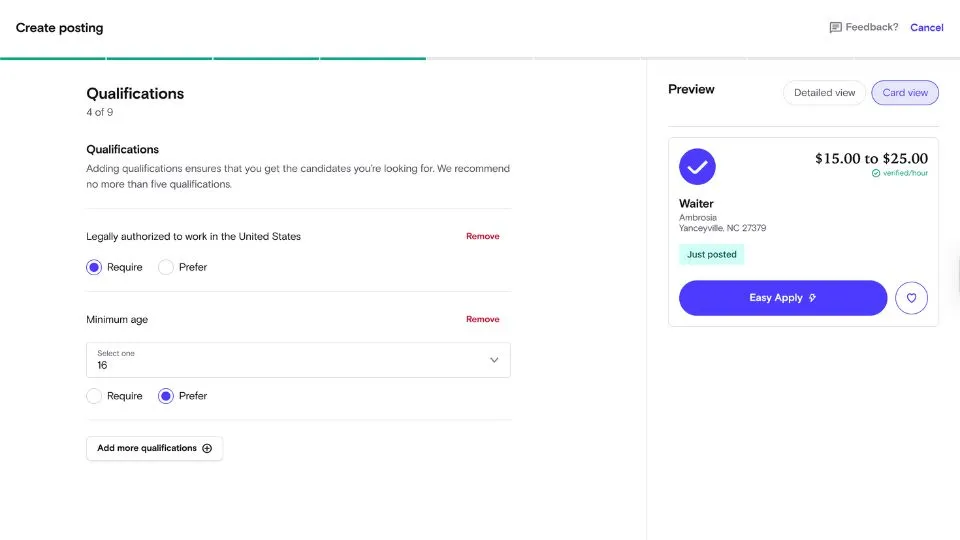
Mark each item as Require or Prefer so Snagajob can prioritize applicants who fit your needs. You can add more qualifications as needed, and the job preview on the right updates as you go.
Select Next when you’re ready to continue.
7. Write the job description
Type a clear and concise job description that highlights the role’s responsibilities, required skills and any perks you want to feature.
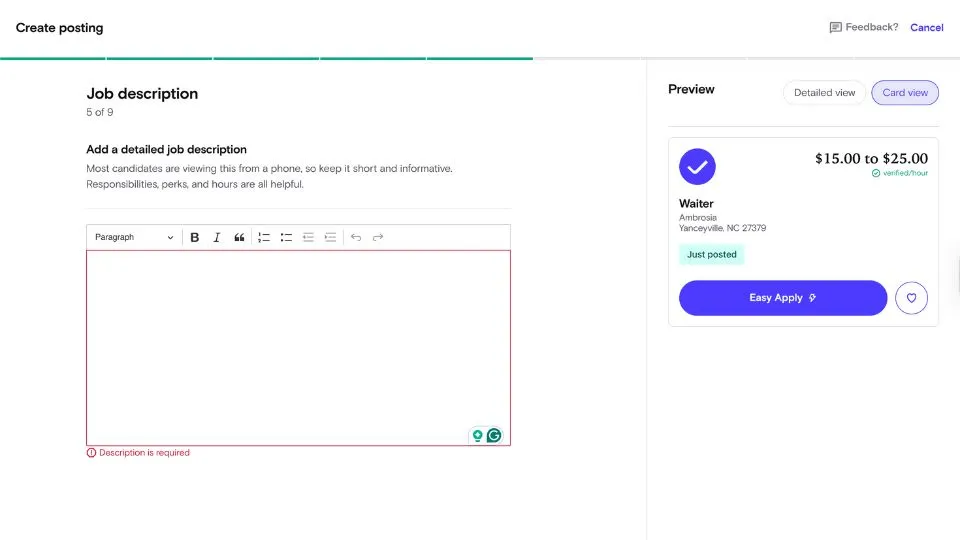
Most applicants will read this on their phones, so keep the text brief, informative and easy to skim. The preview on the right updates as you add content. Select Next when you’re done.
8. Choose how applicants will apply
Select your preferred application method. Easy Apply lets candidates use their Snagajob profile to submit an application quickly, while Redirect sends them to an external site or application form.
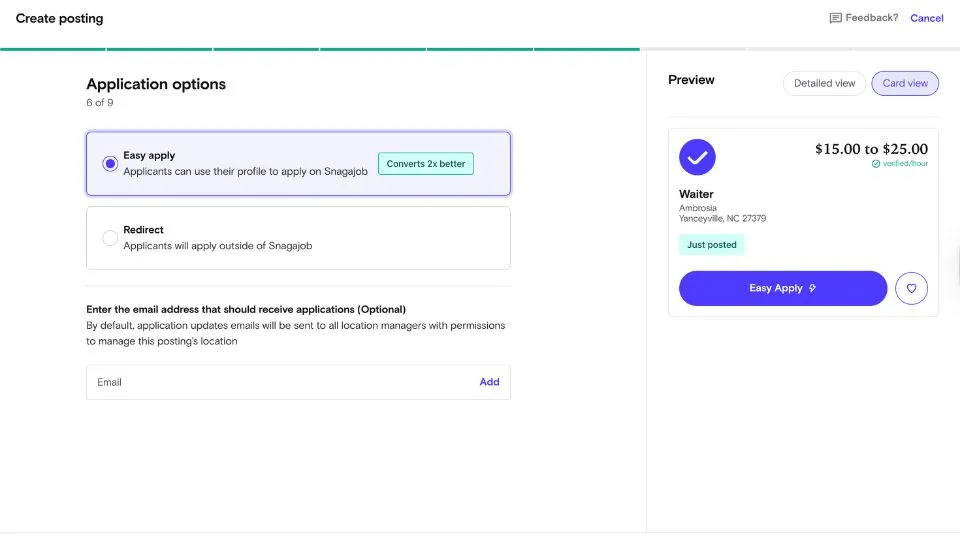
You can also add an email address to receive application updates if you want them sent to a location other than the default inbox of the location manager.
Click Next when you’re ready to move on.
9. Review your job posting
Look over all the details you’ve entered, including the job title, industry, location, pay range, schedule and qualifications.
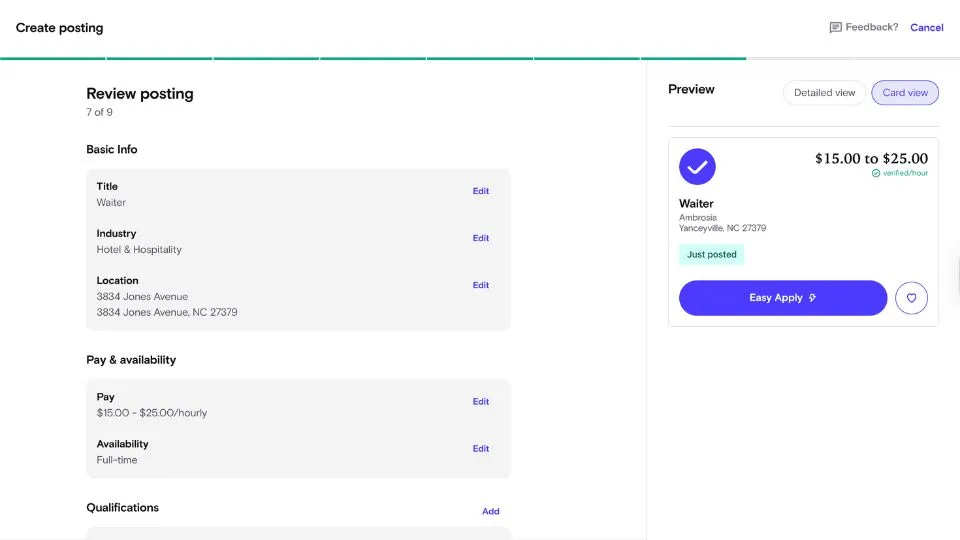
Use the Edit links to make changes to any section before moving forward. The preview on the right shows how the listing will appear to applicants. When everything is accurate, select Next to continue.
10. Set your sponsorship budget
Choose whether you want to promote your job using a daily average, a one-time budget or a monthly budget.
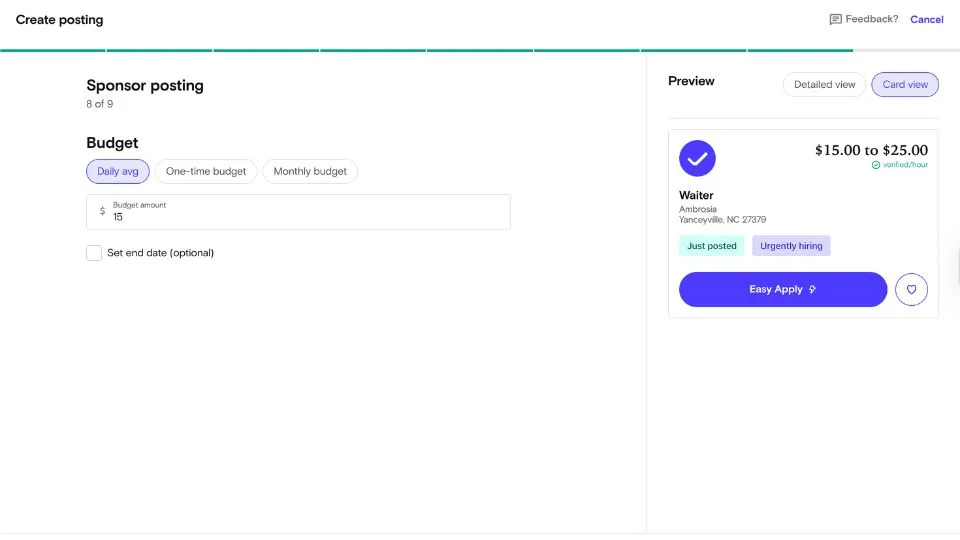
Enter the amount you want to spend and optionally set an end date if you want the sponsorship to stop automatically.
You can also choose Skip sponsorship if you prefer to post the job without promotion. When you’re ready, select Next.
11. Add your payment method
Enter your card details, including the card number, expiration date, CVC and the name on the card.
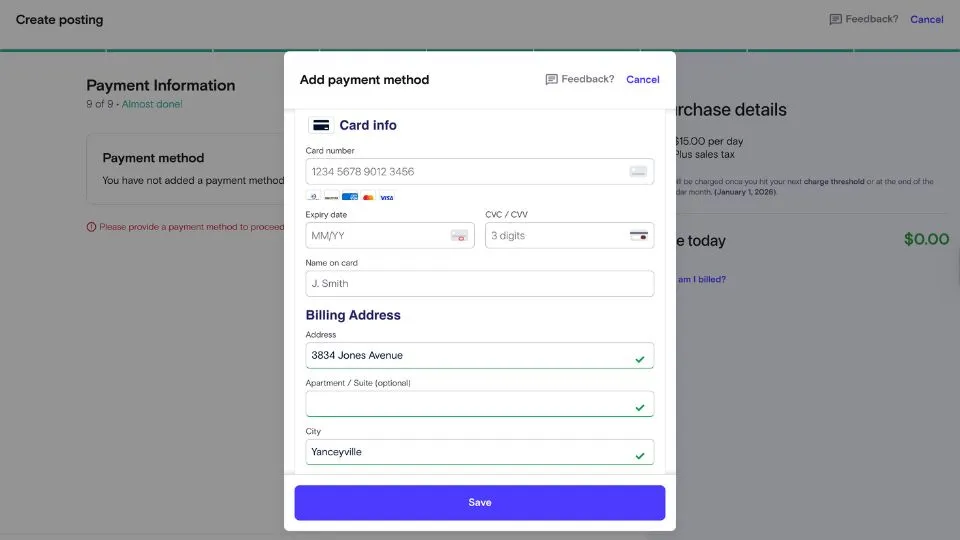
Fill in your billing address to validate the payment method, then select Save to proceed. Once your payment method is added, you can move forward and post your job.
Is Snagajob Free for Employers?
Yes, you can post a basic job on Snagajob without paying any fee. The platform allows employers to list jobs for free, so long as you do not choose to “sponsor” the posting for extra visibility.
If you do choose to sponsor your job, you pay only when candidates click the “Apply Now” button on your posting, rather than a flat listing fee.
Snagajob Job Post Pricing
Snagajob uses a pay-per-apply-click model for sponsored job posts, meaning you only pay when someone clicks the Apply Now button on your listing.
For example, a Waiter position in New Jersey shows a minimum daily average budget of $5, and both the one-time and monthly sponsorship options start at $50.
These amounts can vary by role and location, but they give a good idea of what employers may see.
Snagajob bills in increments rather than charging everything upfront. Your first invoice is issued at $25 to confirm your payment method.
After that, Snagajob sends invoices on the first day of the month for the previous month’s apply-clicks or whenever your balance exceeds $150, whichever comes first. Taxes are added at the current rate.
This flexible setup lets you adjust or pause your sponsorship whenever needed. If you don’t want to sponsor your posting, you can still publish a free, non-sponsored job listing.
Where To Post Hospitality Jobs
When deciding where to post hospitality jobs, Snagajob and OysterLink serve very different needs.
Snagajob is a large marketplace for hourly and shift-based work, which means your listing reaches a broad audience — useful for volume hiring, but less targeted for hospitality roles specifically.
OysterLink, on the other hand, is built entirely for the hospitality industry, making it a stronger option for restaurants, hotels and food-service businesses.
Its job-posting process is simple and streamlined, supported by more than 400 free job description templates that help employers create polished listings fast.
OysterLink also offers affordable pricing and additional resources like labor-law guides, hiring advice, demographics, salary statistics and interview question sets.
These tools help employers post jobs quickly and attract more relevant, hospitality-experienced candidates.
Overall, Snagajob offers broad reach, but OysterLink delivers deeper support and higher-quality applicants for hospitality employers.
Post a Job on Snagajob: Conclusion
Posting a job on Snagajob is a straightforward process from start to finish.
Whether you choose a free post or a sponsored listing, the platform gives you flexibility and control over how your job reaches candidates.
For hospitality employers who need a more targeted and efficient solution, OysterLink provides industry-specific tools, job description templates and insights that streamline hiring and help attract better-matched applicants.