
If you're figuring out how to post a job on Hcareers, you've come to the right place.
This guide walks you through the complete process of creating a job listing on Hcareers, explains pricing and shows you how to get the most from your job post, plus a more cost-effective alternative for hospitality hiring.

How To Post a Job on Hcareers: Step-by-Step
Learning how to post a job on Hcareers is straightforward once you understand the platform's workflow. Here's the complete process from account creation to publishing your listing.
1. Create an Hcareers Employer Account
Before you can post jobs, you'll need to register as an employer on the Hcareers platform.
Visit Hcareers.com and click on "Sign in / Register" in the top navigation. Select "Create an account" and follow the prompts to set up your employer profile.
You'll need to provide your company information, including your business name, location and contact details. This information will appear on your job listings and help candidates learn about your organization.

2. Access Your Employer Dashboard and Click "Post Job"
Once logged in, navigate to your employer dashboard at app.hcareers.com.
From here, locate the "Post Job" button to begin creating your listing. The dashboard serves as your central hub for managing all your job postings, reviewing applications and tracking candidate activity.
3. Enter Your Job Details and Description
This is where you'll provide all the specifics about the role you're hiring for.Start by entering the job title.
As you type, Hcareers will suggest matching titles from a dropdown list—select the most accurate option to help candidates find your listing.
Fill in the complete job information, including:
- Job location and work schedule
- Employment type (full-time, part-time, seasonal)
- Salary range and benefits
- Required qualifications and experience
- A detailed job description outlining responsibilities
4. Review and Publish Your Job Listing
Before your job goes live, you'll see a summary screen showing whether your position is classified as a standard role or a management position—this affects your pricing.
Review all details carefully for accuracy, including spelling, job requirements and salary information. Once you're satisfied, click "Publish" to make your job visible to candidates.
How Much Does It Cost To Advertise a Job on Hcareers?
Understanding the Hcareers job posting cost helps you budget appropriately for your recruiting efforts.
Unlike some job boards that offer free basic listings, Hcareers does not have a free job posting option. All listings require payment.
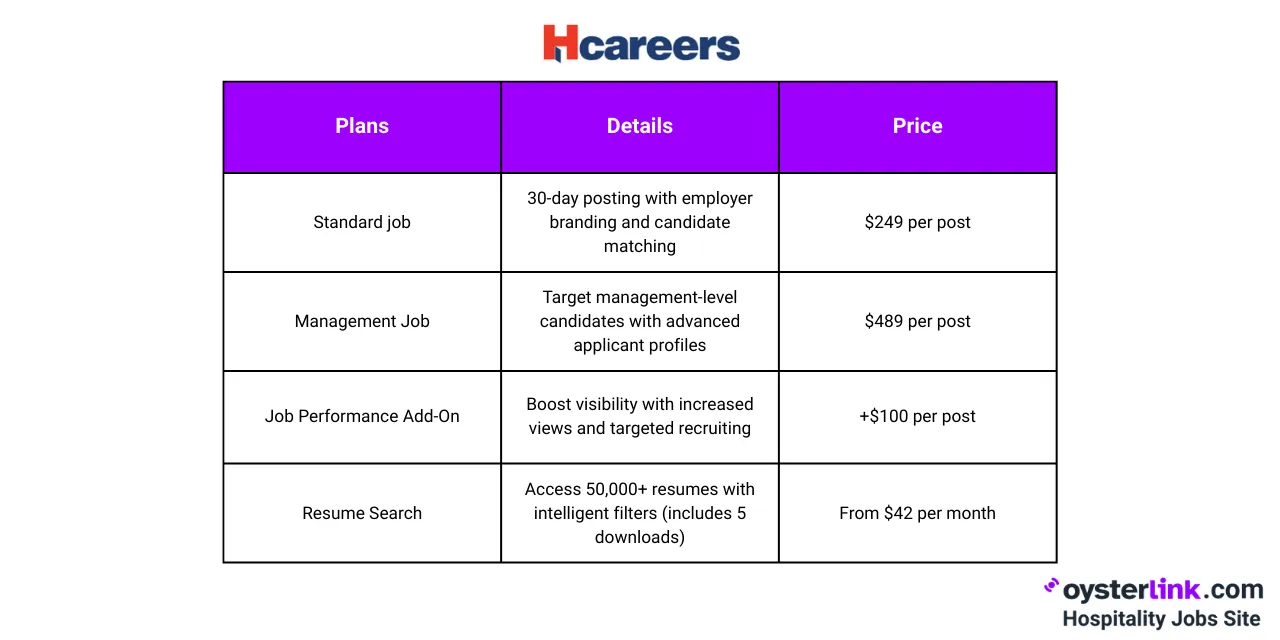
Each job posting remains active for 30 days from the publication date. Employers can boost individual listings with performance packages to increase visibility in search results.
For companies hiring multiple positions, Hcareers offers bulk posting discounts and access to the resume database for employers who purchase 15 or more job postings.
How Do You Post Jobs on Hcareers Effectively?
Knowing how do you post jobs on Hcareers is only half the battle—posting them effectively is what brings in quality candidates.
Hcareers uses AI-powered candidate matching technology with a composite "Fit Score" that considers factors like skill set, salary expectations, company culture and values.
To maximize your listing's performance:
- Write compelling job titles
- Be specific about compensation
- Highlight your company culture
- Use the Resume Detective feature
- Respond quickly to applicants
Steps To Post a Job on Hcareers: Best Practices
Following these steps to post a job on Hcareers will help you stand out among the thousands of hospitality employers competing for talent.
Optimize Your Job Description
Keep your job description clear, concise and focused on what matters most to candidates. Include:
- Day-to-day responsibilities
- Required skills and qualifications
- Growth opportunities and career paths
- Benefits and perks that set you apart
- A brief introduction to your company
Avoid jargon and overly formal language. Hospitality candidates respond better to descriptions that feel approachable and realistic about the role.
Choose the Right Job Category
Hcareers organizes listings by category, brand and location. Selecting the correct category ensures your job appears in relevant searches.
The platform covers a wide range of hospitality roles, from entry-level positions like housekeeping and front desk to executive roles in hotel management and restaurant operations.
Consider Timing
Job postings receive the most visibility shortly after publication. If you're hiring for seasonal positions or have a specific start date in mind, plan your posting accordingly.
The 30-day listing window gives you enough time to collect applications, but you'll want to be active in reviewing candidates during the first week or two when your listing is freshest.
Track Your Results
Use Hcareers' applicant tracking features to monitor how your job is performing. If you're not getting enough qualified applicants, consider:
- Adding the $100 performance boost
- Revising your job description
- Adjusting salary range to be more competitive
- Updating your employer profile page
Better Alternative: Post Hospitality Jobs on OysterLink
While Hcareers has served the hospitality industry since 1998, OysterLink offers a more affordable and targeted solution for restaurants, hotels and hospitality businesses.
Here's why hospitality employers are switching to OysterLink:
- Lower cost than Hcareers’ standard $249 job posting rate
- Purpose-built for hospitality, not a general job marketplace
- 350,000+ active monthly users—all focused on hospitality careers
- Coverage in 400+ U.S. cities with more than 100,000 open jobs
- Trusted by industry leaders like Chipotle, Marriott, and Starbucks

OysterLink provides tools that Hcareers doesn't offer for free:
- 400+ job description templates for roles ranging from Baristas to Chefs
- Role-specific interview questions to help you evaluate candidates
- Salary guides with data broken down by state and city
- Labor law information to keep your hiring compliant
How To Create a Job Listing on Hcareers: Conclusion
Creating a job listing on Hcareers follows a simple four-step process: set up your employer account, access your dashboard, enter your job details and publish.
However, for hospitality employers seeking a more cost-effective alternative, OysterLink offers lower pricing, plus free resources.
Whether you choose Hcareers or OysterLink, the key to successful hospitality hiring is writing clear job descriptions, responding quickly to applicants and showcasing what makes your company a great place to work.